25. October 2026
increment: reading a change as two aligned files, in a terminal
A patch shows you what changed. It doesn’t show you the file the change landed in. increment is my attempt at showing both, without leaving the terminal.
increment is a terminal diff viewer. The command is inc. It renders a change as two aligned panes, old on the left and new on the right, with each line level with the line it corresponds to. Modified lines get word-level highlighting, unchanged regions fold away, and in the interactive browser there’s a change map down the right edge. The reference I was copying is the JetBrains diff view, and the goal was to get that view in a terminal and in a pipe.
It’s for anyone who reviews changes at the command line and finds that git diff tells them what changed but not where in the file it sits.
I built it over three days, 26 to 28 August 2026, in numbered phases. The first release, v2026.8.0, went out on 28 August, and the current one is v2026.10.1. It’s 9,864 lines of Rust across 34 files in src/, plus 1,349 lines of integration tests, with 292 tests in all. It was called gdiff for its first day and became increment, with the command inc, on 27 August.
What it looks like
Two files, at 90 columns, with split view forced (--view auto only splits at 120 columns or wider):
$ inc --view split old.rs new.rs
old.rs → new.rs  +0 -0 ~2
fn main() {                             │ 1   1 │fn main() {
    let x = 1;                          │ 2 ~ 2 │    let y = 2;
    println!("{}", x);                  │ 3 ~ 3 │    println!("{}", y);
}                                       │ 4   4 │}
That’s the colourless version. In a terminal both panes are syntax-highlighted, and the changed characters within each ~ line are highlighted too:
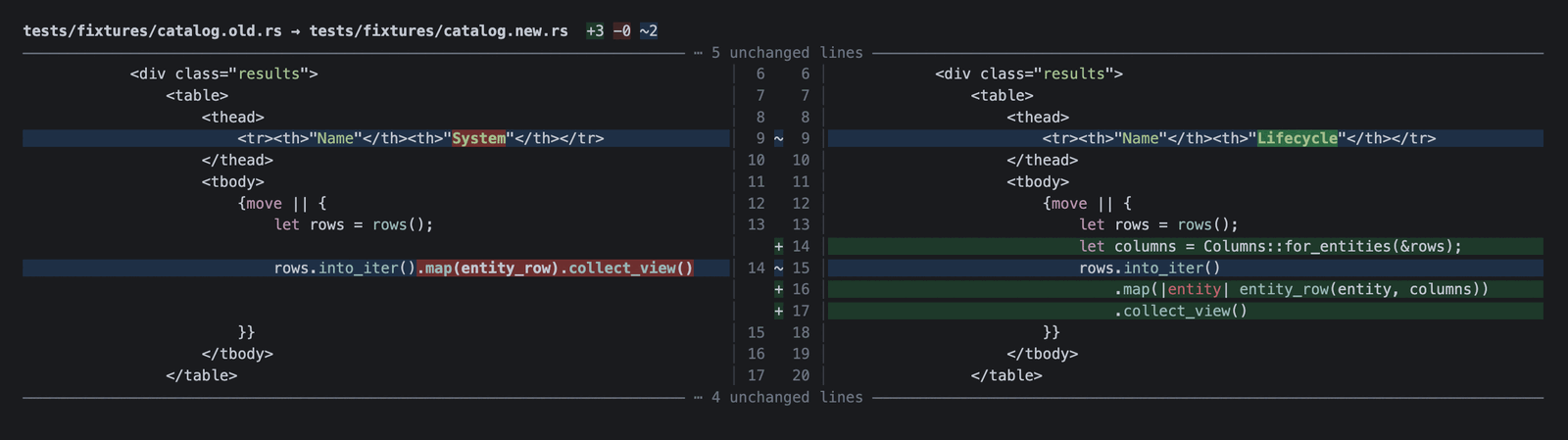
In that screenshot, line 9 changed one word, so only System and Lifecycle are highlighted rather than the whole line. Line 14 on the left was split across lines 15 to 17 on the right, with a new line added above it, and the added lines sit opposite blank space instead of pushing the left pane out of step. The five unchanged lines above and four below are folded. The header line counts additions, removals and modifications separately. A line that was edited counts as one modification, not as a removal plus an addition.
The ways in
inc old.rs new.rs              # two files
inc git                        # HEAD against the working tree
inc git main..feature          # one revision against another
inc git HEAD~1..HEAD src       # …restricted to a path
inc --ui tui git               # the interactive browser
inc review main..feature       # walk a branch commit by commit
inc --format json old.rs new.rs
Exit codes follow diff(1): 0 for identical, 1 for different, 2 for trouble. A script that already wraps diff works unchanged.
--format json gives you the same rows the terminal view is drawn from. Each row has a kind (equal, added, removed, modified, replaced, moved or fold), the line number and text on each side, and character ranges for the word-level emphasis. The terminal output, the browser and the JSON are all rendered from one computed model, so a script sees the same pairing a person does.
Branch review
inc review is modelled on tig, the long-standing text-mode interface for git. It opens a commit list with the working tree as the top row. Enter opens what that commit did in the split view. Moving the selection with the view open follows it. Tab cycles from the commits to the commit’s file list to the diff and back.
Two details make this usable on long branches. History is walked in the background, so the first screen shows immediately. The diff loads when you stop moving, so holding j down the log stays instant. The file list also keeps its selection between commits, so you can follow one file’s history down a branch without picking it again on every commit.
Settings you change while reading
In the browser, every setting that affects reading can be toggled without restarting, and ? shows the keys and the current value of each. f switches between changed parts and the whole file. x cycles whitespace handling. m toggles move detection. w, s, t and # control wrapping, syntax colour, theme and line numbers.
f, x and m change what the diff is, so they re-diff the files. The rest only change how it’s drawn. In a review they carry from commit to commit, because a setting belongs to the reader, not to whichever commit they were looking at.
Folding can be undone because increment reads both sides in full. That’s why f can show the whole file.
Moves shown as moves
A block that moved within a file is marked < where it left and > where it arrived. Without that, a moved block appears as a wall of deletions and an unrelated wall of additions. Detection is per file: a block moved from one file to another isn’t caught.
As a git difftool or pager
git config --global difftool.increment.cmd 'inc "$LOCAL" "$REMOTE"'
git config --global core.pager 'inc --patch'
The pager path is lower fidelity, and the reason is worth knowing. A pager receives the diff git already decided to print, which is a few lines of context around each hunk and nothing else. There’s no whole file to show, nothing to unfold, and nothing to re-diff with different whitespace settings. increment still re-diffs each hunk, so the pairing and word highlighting are its own. But where you have the choice, inc git reads both sides in full and does more.
increment reads the repository in process through gix, a pure-Rust git implementation. It never shells out to git, and it has no C dependencies.
Why another diff tool
There are good terminal diff tools already, and for some jobs one of them is the better choice.
delta is a styled pager for git’s own output, with side-by-side mode, syntax colour and word-level highlighting. If you want git diff and git log -p to look better and nothing more, use delta. difftastic diffs syntax trees rather than lines, so it ignores reformatting and reports changes at the level of expressions. If you need to know what changed structurally, use difftastic. icdiff is a small Python script for a two-column comparison of two files.
My survey before starting, which is in the repository as design/001-visual-diff-state-of-the-art.md, concluded that the styled-pager niche is solved and crowded, but none of the split-view renderers I found combined real alignment, undoable folding and a change map. That’s the gap increment aims at: reading a change as two aligned files rather than as a patch, with branch review in the same view.
Structural diffing is out of scope on purpose. tree-sitter grammars are C, increment has no C dependencies, and difftastic already does it well.
Install
It isn’t on crates.io, because increment, inc and incr are all taken there. Prebuilt archives for macOS (arm64, x64), Linux (arm64, x64) and Windows x64 are on the releases page, with SHA256SUMS. With Homebrew:
brew tap grahambrooks/increment https://github.com/grahambrooks/increment
brew install increment
Or from source:
cargo install --git https://github.com/grahambrooks/increment
The licence is MIT.